Part 1 | JVM Series | Memory

People often start developing JVM based applications either through their job requirements or out of their own interest, but most of them lack understanding of how JVM works and the internals of object creation, references, threads and many more. This is highly due to their inexperience with dealing with scale and not struggling with production issues (bcoz one night you decided to increase the RAM percentage of your heap allocation to 80%, hence OOMKilled 😁) . Understanding these concepts can highly improve one’s understanding towards creating applications that can scale to millions (like netflix) by using JVM based applications and making better decisions.
Will be publishing these JVM blogs in a series format. For this.part we will be looking at how memory is managed inside JVM.
JVM Memory Model
One might have used these JVM options
- Xms
— Initial Heap Size Sets the starting size of the Java heap. - Xmx
— Maximum Heap Size Sets the maximum allowed size of the Java heap. - XX:NewSize=
— Initial Young Generation Size Specifies the initial size of the Young (new) Generation. - XX:MaxNewSize=
— Maximum Young Generation Size Sets the maximum size that the Young Generation can grow to. - XX:MaxPermSize=
— Maximum Permanent Generation Size (Deprecated in Java 8+) Sets the max size for the Permanent Generation, which stored class metadata. - XX:SurvivorRatio=
— Survivor Space Ratio Defines the ratio between Eden and Survivor spaces in the Young Generation. Example: -XX:SurvivorRatio=2 with a 10 MB Young Gen results in 5 MB Eden and 2.5 MB for each Survivor space. (Default value: 8 → Eden:Survivor = 8:1:1) - XX:NewRatio=
— Old-to-Young Generation Size Ratio Sets the ratio of Old Generation to Young Generation sizes. Example: -XX:NewRatio=2 results in 1/3 heap for Young Gen, 2/3 for Old Gen. (Default: 2)
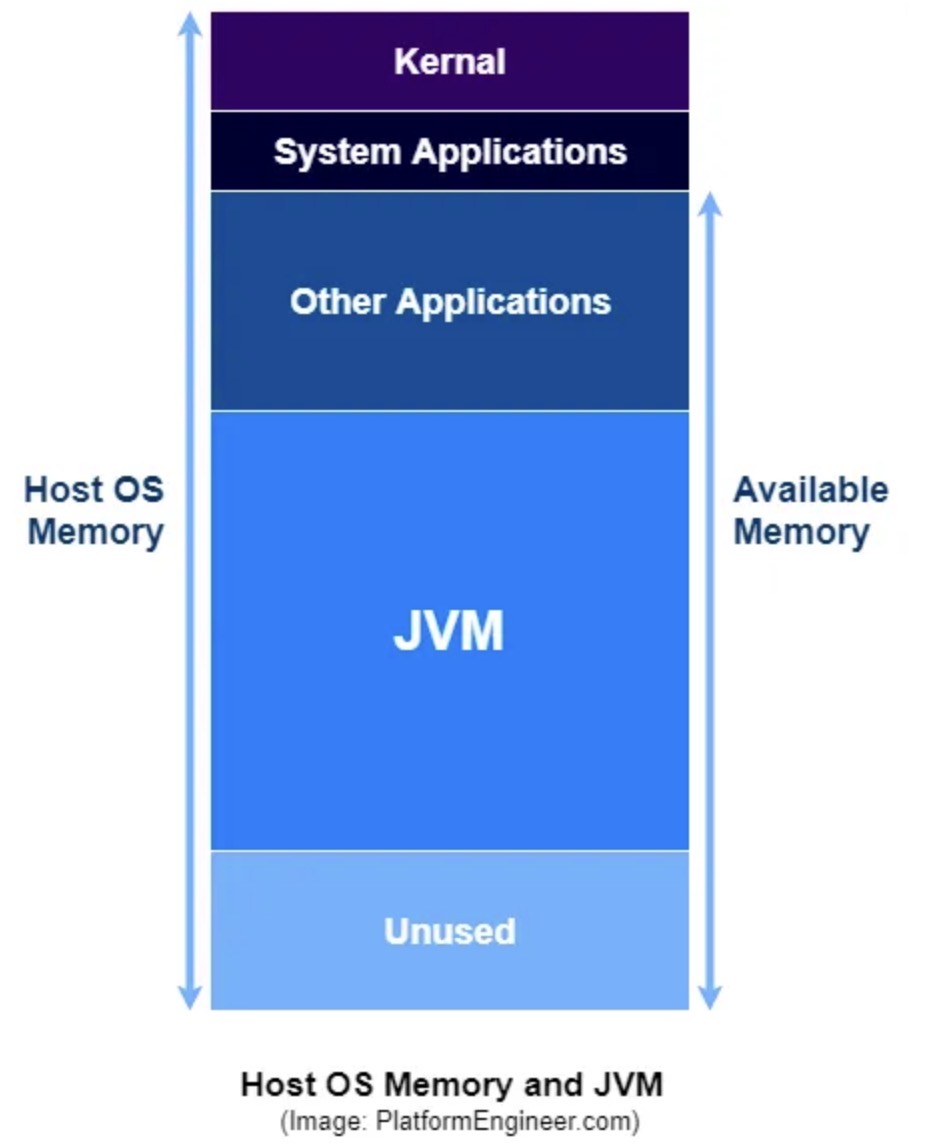
This is where the JVM resides on the host
Heap Memory
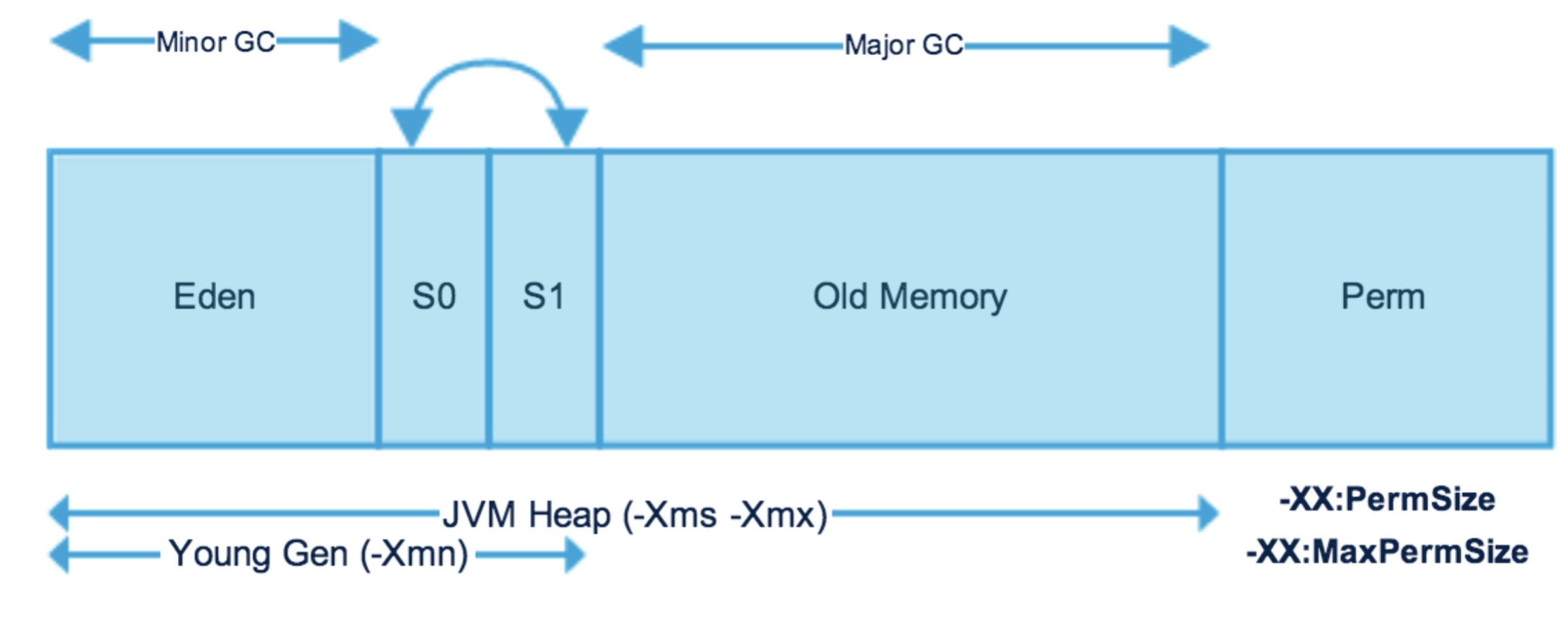
Heap memory is a crucial area of memory used to store objects created during the execution of a Java program. It’s a dynamic memory area where objects are allocated and deallocated as needed by the running application. The JVM’s garbage collector automatically manages the heap, reclaiming memory used by objects that are no longer reachable. Heap memory is divided into 2 parts:-
- Young Generation
- Old Generation
Heap memory is allocated when the application starts (-Xms) which increases/decrease during application runtime. We also limit max memory a heap can reach (-Xmx)
Young Generation
Newly created objects reside here. There are 3 parts of young generation memory
- Eden Memory
- Survivor Space 1 (S0)
- Survivor Space 2 (S1)
When Eden Space is filled with objects, the minor GC (young collection) is performed and objects that survive are moved to one of the survivor spaces. Minor GC also checks existing objects in the survivor space and moves the surviving ones to the other survivor space. At a time one of the survivor spaces is empty.
Objects that survive multiple GC cycles are moved to the store room (old generation)
Old Generation
The Old Generation space is dedicated to storing objects that have persisted through multiple rounds of Minor GC cycles. Once this space becomes full, a Major GC (also known as Old Collection) is triggered, which typically requires more time to complete than Minor GC operations.
In Java, an object survives a Garbage Collection (GC) cycle if it is reachable from a GC root. GC roots are specific starting points, such as local variables or static fields, from which the garbage collector starts its search. If the garbage collector can reach an object by following references from these roots, the object is considered “live” and will not be collected.GC roots are objects that are themselves referenced by the JVM and thus keep every other object from being garbage-collected
Non-Heap Memory
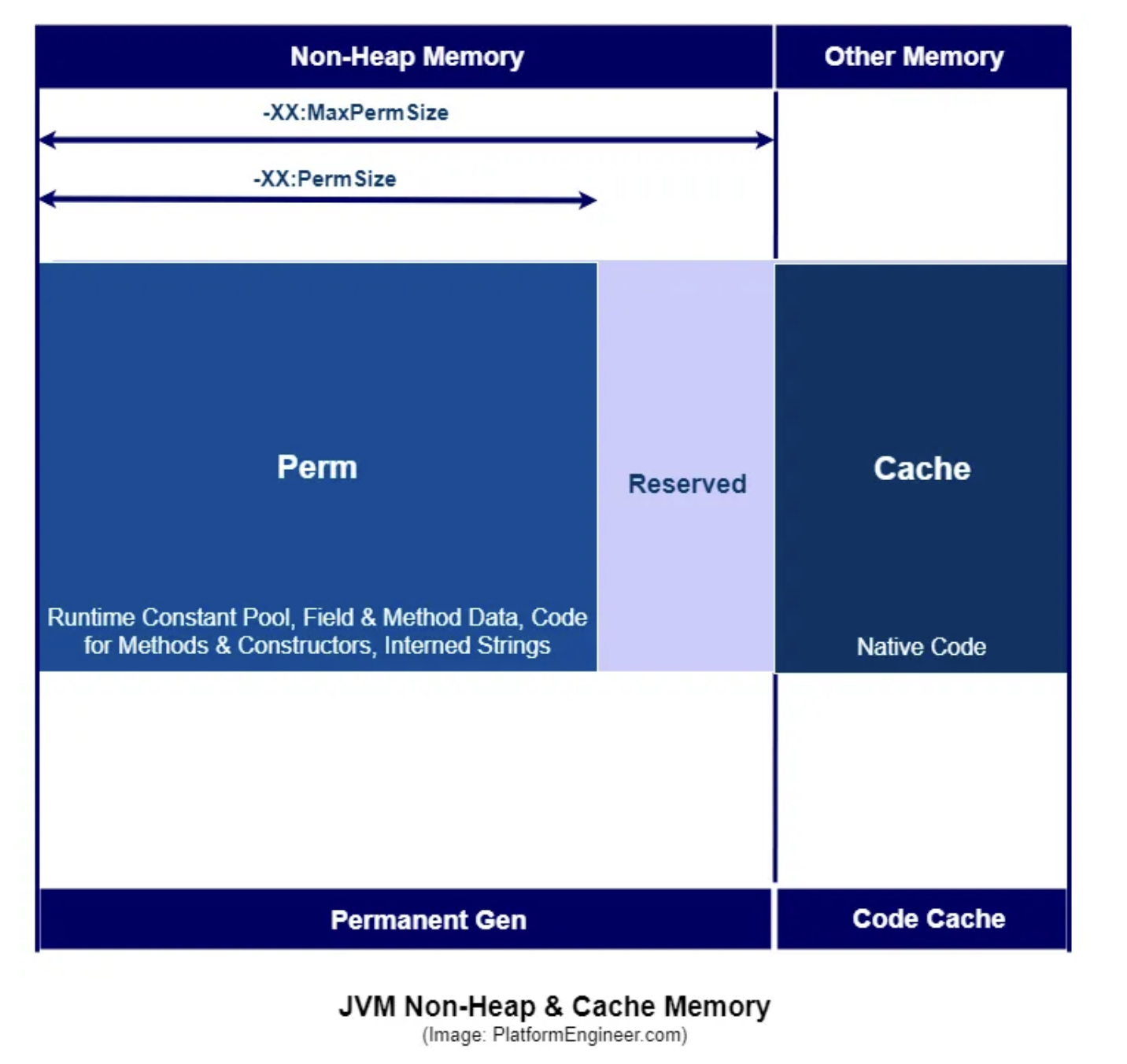
In the JVM, non-heap memory refers to areas of memory managed outside the main heap, used for various internal and system-level operations. Key components of non-heap memory include Metaspace, which stores class metadata and replaced PermGen from Java 8 onward, and the Code Cache, which holds JIT-compiled native code to improve performance. Direct memory (or off-heap memory), often used in high-performance IO with ByteBuffer.allocateDirect(), is another important area, as it bypasses garbage collection. Each thread also has its own stack memory for storing method call frames and local variables, controlled via -Xss. Additionally, JNI memory is allocated when Java interacts with native libraries, and internal JVM structures consume memory for tasks like GC bookkeeping, symbol tables, and method metadata. Together, these areas form the non-heap memory landscape, which plays a crucial role in the efficient execution of Java applications.
Conclusion
Understanding JVM memory management is crucial for developing robust and scalable Java applications. We’ve explored the fundamental components of JVM memory, including heap memory with its Young and Old generations, and non-heap memory areas like Metaspace and Code Cache. This knowledge helps developers make informed decisions about memory allocation, garbage collection, and performance optimization. By properly configuring JVM parameters and understanding memory management principles, developers can prevent common issues like memory leaks and OutOfMemoryErrors, ultimately creating more efficient and reliable applications.
In subsequent parts of this series, we’ll delve into other important aspects of JVM, including garbage collection algorithms, thread management, and performance tuning techniques. Stay tuned!
References
- JVM Internals — http://blog.jamesdbloom.com/JVMInternals.html
- Stack Memory and Heap Space in Java — https://www.baeldung.com/java-stack-heap
- Java (JVM) Memory Model — Memory Management in Java — https://www.journaldev.com/2856/java-jvm-memory-model-memory-management-in-java
- Java Memory Management for Java Virtual Machine (JVM) — https://betsol.com/2017/06/java-memory-management-for-java-virtual-machine-jvm/